Cooperative Federal Credit Union
Online Loan Payments
Option 1: Pay from your Coop Fed Account
Quick and simple! Use the “Transfers” feature in Online Banking or the Coop Fed Mobile App. You can make a one-time payment or schedule recurring automatic payments.
Login
Payments made to VISA Credit Cards take 1-2 business days to be processed. For instant payments as well as detailed transaction history, use the EZ Card Portal. All other payments are processed immediately.
Option 2: Pay from an outside account
Make payments online or by text message, using any outside bank account or debit card. Fast, secure, and FREE.
Make a Payment
Important: You can only see loans for which a payment is currently due.
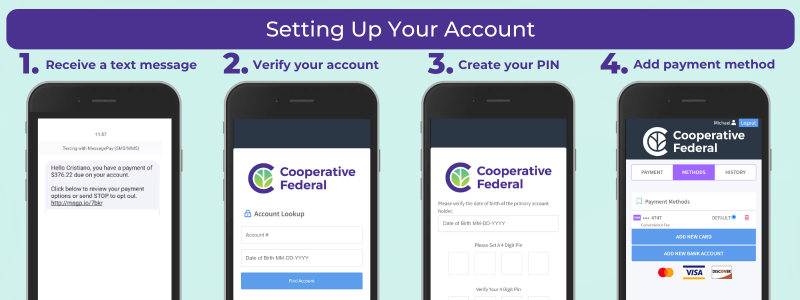
How it Works:
- You will receive a text message informing you of the amount due on your loan. You can review your payment options, or you can opt out of text reminders by texting “STOP.”
-
If you have not received text message payment notifications, or you previously opted out and want to rejoin this service, please send us an email including your full name and mobile phone number.
-
- Click the link in the text message (or LOGIN here) to enter the Message Pay portal, where you will be asked to lookup your account:
- Enter your 10 digit Member Number.
- Enter your Date of Birth. For joint accounts, this should be the primary account owner's DOB. For business/organization accounts, this should be the entity start date associated with your account.
- Enter your 4-digit PIN.
- First time users will need to complete setup:
- Create a 4-digit PIN. Store this information securely. You will need this to verify future payments.
- Once your PIN is created, you will enter the Message Pay secure portal.
- Click the "Methods" tab to set up one or more payment methods. Select "Add New Bank" to pay by account transfer from an outside bank or credit union, or select "Add New Card" to use a Debit Card (Credit Cards cannot be used).
- Inside the payment portal, you will see all of your loans that have payments due. You will also be able to select your preferred payment method.
- The portal will show loans associated with the 10-digit Member Number used for login. If you have multiple accounts, you can log in separately to each account.
- Now you can make fast, FREE payments online and by text message.
- Encrypted information guarantees your information is secure
- Free to use, with no transaction fees
- Payments are posted to your account in approximately 1 business day
Get the benefits of this great service - don't opt out of Coop Fed Message Pay!
More ways to pay
Coop Fed gladly accepts loan payments by check or money order. Payments can be mailed or deposited at our offices.